%202.svg)
Compare the best church fund accounting software for 2026. See which tools do true fund accounting, which need workarounds, and what each costs.
Church money almost never shows up as one clean pile. A building-fund gift, a missions offering, a restricted memorial, and the general operating budget all end up in the same accounts. But they can’t be spent the same way.
Regular church accounting software treats everything as interchangeable cash. True fund accounting software keeps each purpose separate. This lets you prove where every restricted dollar actually went.
Most churches begin their search looking for reliable church accounting software that handles everyday finances without unnecessary complexity. The deeper question is whether you also need true fund accounting. This guide shows which tools deliver native fund accounting and which rely on workarounds from my own experience as a church treasurer and from working with ministries across the country through our integrations.
Scroll down to see the comparison table and our top picks.
QuickBooks is the platform I see in more churches than anything else. Bookkeepers and CPAs already know how it works. Payroll connects without drama, and plenty of third-party tools plug in easily.
At my own church we handle most of the bookkeeping here. We only deal with fund separation through a quick monthly process. It wasn’t built for churches, so fund accounting needs workarounds and there’s no built-in real-time expense visibility.
For the price and the help network around it, most churches get 90 percent of what they need and live with the rest. A lot of places are better off here than spending thousands more for features they’ll barely touch. Read our QuickBooks Online review.
Aplos was built for churches and nonprofits from the start. It handles fund accounting without extra steps. It includes donor tracking and giving statements, and gives you clean balance sheets by fund.
The interface stays simple enough that volunteers can use it. Entry-level pricing starts around $59 per month. It’s my first recommendation when a church says the Excel workaround is starting to feel like a real headache.
Many smaller churches appreciate that they can get started without a long implementation. Read our Aplos review and visit the official site at aplos.com.
Realm puts church management and fund-based accounting in the same system. It works well for churches already in the ACS world or that want member data and giving history in one place. Fund accounting is native.
Integrations with outside data often need file imports instead of real-time sync. Expense tracking stays manual. It’s a solid fit when the membership side matters as much as the books. Read our Realm review.
Shelby was made for church finance workflows. It supports advanced reporting, multi-campus setups, and true fund accounting. It assumes someone experienced is running it day to day.
Smaller churches without that depth can feel overwhelmed. Pricing is custom. It’s worth considering when reporting complexity justifies the cost. Read our ShelbyNext Financials review and the official site at shelbysystems.com.
ParishSOFT handles diocesan and multi-entity reporting cleanly. It includes donor management and supports fund accounting. It scales to bigger organizations but adds more complexity to manage.
Expense automation stays limited. It shines when the church already lives in that ecosystem or needs multi-entity clarity. Read our ParishSoft review.
PowerChurch Plus includes fund accounting and donor tracking in a stable desktop package. No monthly subscription for the core software. It doesn’t offer cloud access, modern integrations, or automated expense tools.
It works for churches that like offline systems and already have someone comfortable keeping it running. Read our PowerChurch Plus review.
ChurchTrac keeps the price low and bundles membership, giving, and basic finances. Fund accounting only comes as a paid add-on. Integrations are minimal and accounting depth is light.
It’s fine for very small groups that mainly need simple giving tracking and can add the fund module later if they need it. Read our ChurchTrac review.
At my church we often receive specific gifts for specific funds. For example, a $1,000 gift restricted for the building fund. In QuickBooks it showed up as both cash and profit. That money couldn’t pay rent or support a missions trip, yet the books made it look available.
Every month I export the balance sheet to Excel and manually subtract every restricted balance. Leadership can then see what was truly spendable. The workaround works, but it takes time and leaves room for error.
True fund accounting software tracks money by its purpose from the moment it arrives. It can produce a balance sheet for one fund alone. General tools cannot do that without manual adjustments or class-based tricks.
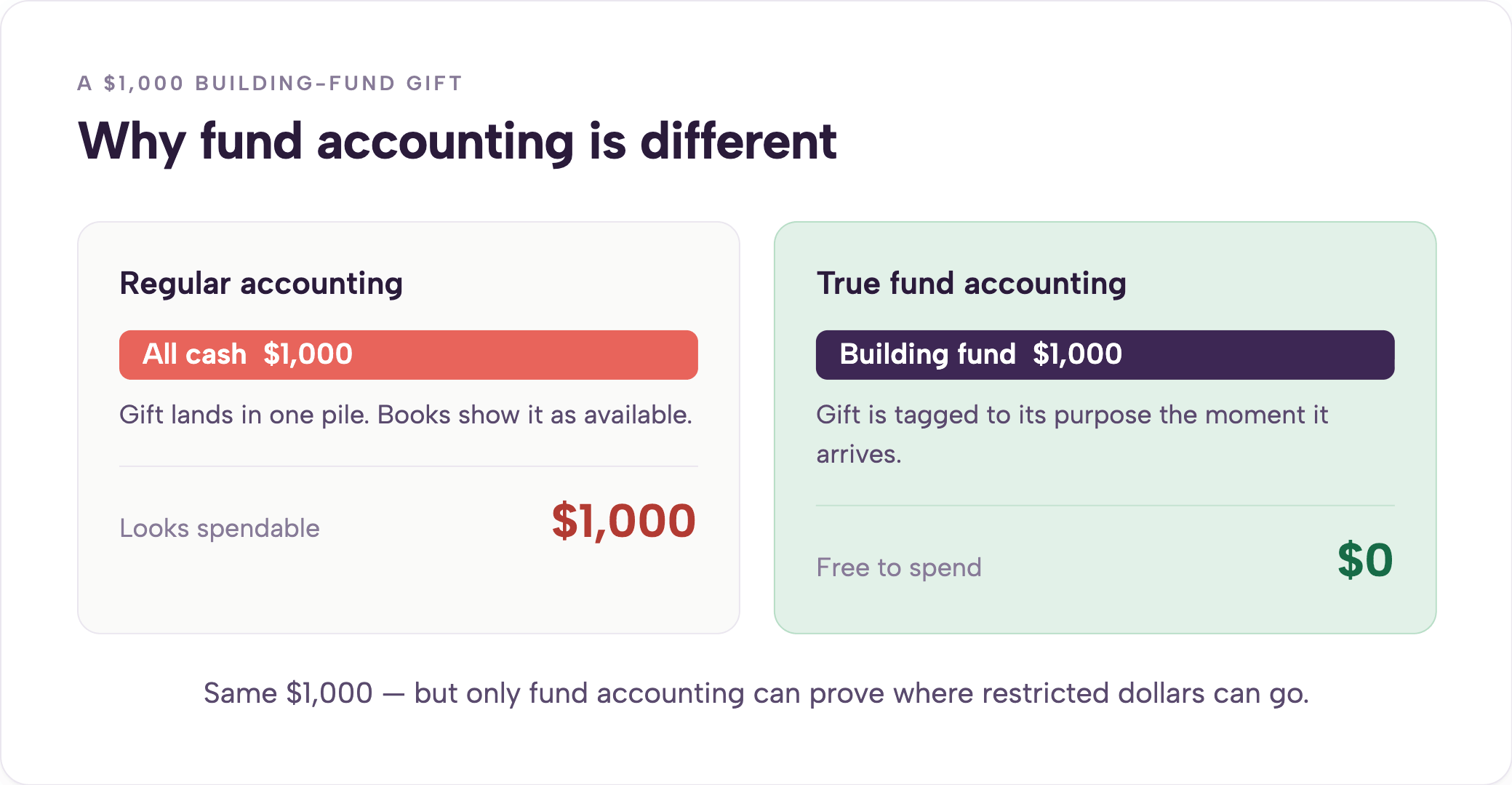
You notice the difference the first time a donor or auditor asks exactly how much remains in the building fund. Churches with only a few restricted gifts often stay with QuickBooks and accept the monthly Excel step. Churches with more complex restricted money, multiple campuses, or regular audits may need native fund accounting even if it costs more.
Fund accounting software tracks restricted and unrestricted funds separately and can report a balance sheet by fund. Aplos, Realm, ShelbyNext Financials, ParishSOFT, and PowerChurch offer native fund accounting. QuickBooks Online requires class-based workarounds and cannot produce a balance sheet by fund without manual steps.
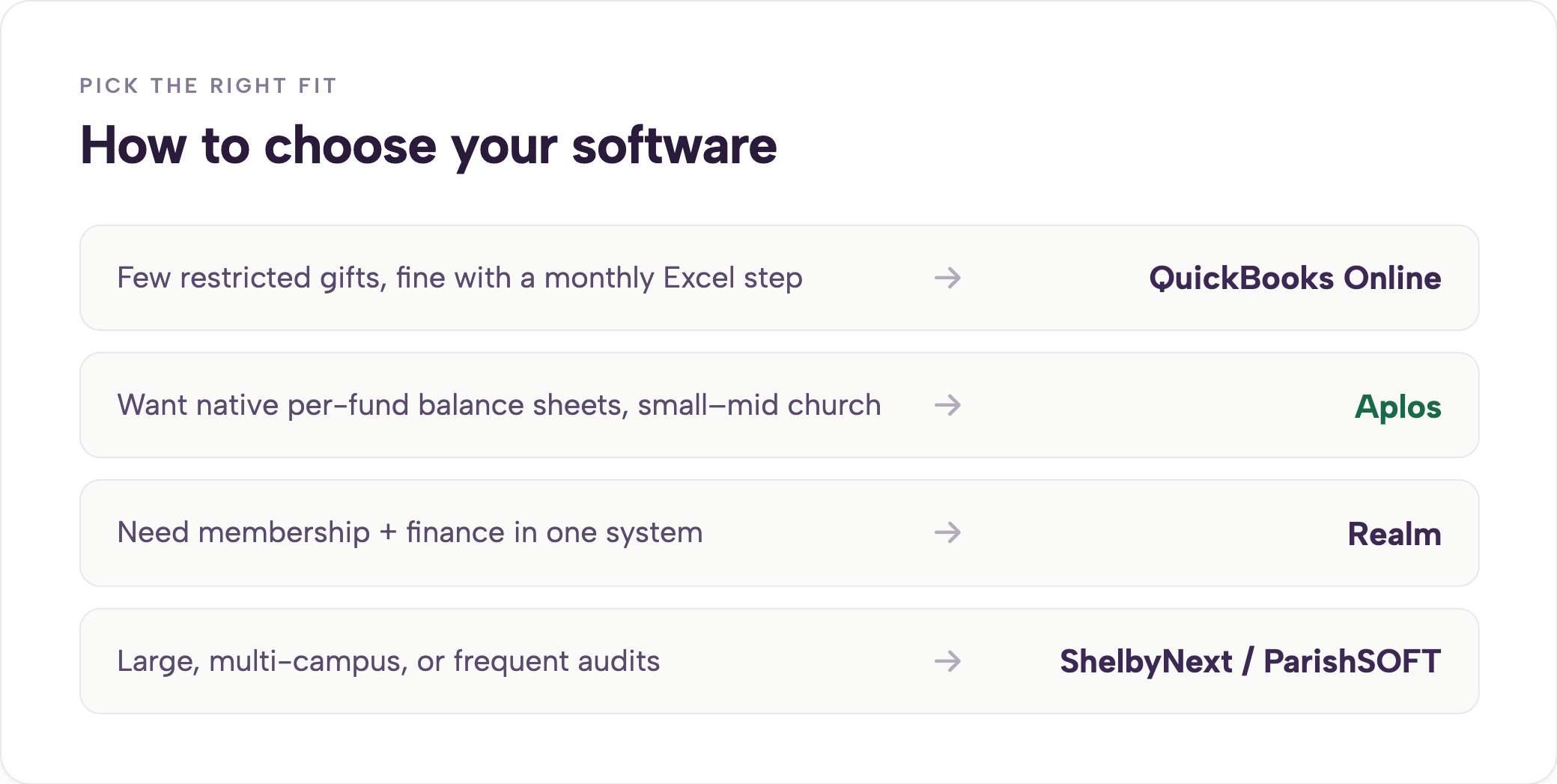
The best option depends on size. QuickBooks works for most churches that can handle a little manual work. Aplos suits small-to-mid churches needing native simplicity. ShelbyNext or ParishSOFT fit larger multi-campus settings.
Start by asking whether you actually need true fund accounting. If restricted gifts are few and the Excel workaround feels fine, QuickBooks is still the practical choice for most churches. If you want clean per-fund balance sheets without monthly manual fixes, start with Aplos.
Then look at Shelby or ParishSOFT for larger or more complicated setups. Next think about who will actually use the system. Volunteer treasurers and part-time staff need something straightforward.
Tools that require a full-time experienced finance person often create more headaches than they solve. Donor tracking matters for a lot of churches. Some tools include it natively. Others expect you to keep a separate system.
Decide early whether you want giving history and statements in the same place as the general ledger. Integrations protect your flexibility. Keeping accounting separate from your church management system lets you change one without forcing changes to the other.
Check whether the tool connects directly to what you already use or requires file imports every month. Finally weigh cost against what you actually need. Some platforms charge thousands per year mainly for native fund accounting.
If your church is under a few hundred people and restricted gifts are straightforward, that premium rarely pays for itself.
Accounting platforms record what already happened. They don’t decide who can spend, how much, or on what before the transaction goes through. That gap is where most churches still lose time and visibility.
At KleerCard we built the spending layer that sits next to your accounting software. You issue physical or virtual cards with per-fund or per-ministry budgets. Transactions show up in real time.
Receipts get captured at the point of purchase. Coded entries flow into QuickBooks, Aplos, Shelby, Realm, ParishSOFT, or ACS. The accounting system stays the record of truth.
The card system just makes sure the right money is available and documented before anyone swipes. We don’t replace accounting software. We make the spending that feeds it cleaner and faster.
A lot of churches add KleerCard after they’ve already picked their accounting platform. They see month-end close drop from days to minutes. See how it works with expense management for churches or sign up to try it alongside what you already use.
For most small-to-mid-size churches that need native fund accounting without overpaying, Aplos is the clearest choice. QuickBooks with a light monthly workaround remains the better option for the majority of congregations that don’t want to spend thousands extra for features they’ll rarely use.
Yes, if you regularly receive restricted gifts or need to report clearly on designated funds to leadership, donors, or auditors. Many smaller churches manage with QuickBooks and a simple process. Larger or more complex ministries usually need native fund accounting to stay accurate and audit-ready.
Yes. At my church we’ve used it successfully for years. It handles the core books well. Fund separation requires a monthly export and manual adjustment, but that trade-off works for a lot of congregations given the low cost and wide availability of help.
No dedicated church edition exists. Churches adapt QuickBooks Online with a church-style chart of accounts and class tracking. The workaround works for most day-to-day needs.
QuickBooks is the most common by far. Aplos, Realm, ShelbyNext, and ParishSOFT show up regularly in mid-size and larger churches that need stronger fund accounting out of the box.
For many smaller and mid-size churches, no. The combination of QuickBooks plus a light monthly process delivers enough clarity without the higher price tag or steeper learning curve of native fund accounting platforms. Larger churches or those with frequent audits and complex restricted gifts often find the investment worthwhile.
Several tools offer free or low-cost entry tiers, including limited versions of ChurchTrac and some open-source options. Free versions usually lack depth in fund accounting, integrations, or support. Most growing churches eventually move to a paid platform that matches their actual workflow.
Start with whether your church needs true fund accounting or can live with a simple workaround. Match the tool to your size, volunteer capacity, and budget. QuickBooks remains the right call for most churches.
When native fund accounting becomes necessary, Aplos is the practical next step for the majority of ministries that don’t need enterprise complexity. Accounting software records the past.
Pair it with a spending system that controls what happens next. Your finance team spends far less time chasing problems and more time supporting ministry. How church fund accounting works explains the mechanics in more detail if you want to go deeper.


Speak to a member of our team and we can have you up and running in minutes, not weeks.